Website leads, deal pipeline, customers with contract terms and emails in one system. A won deal becomes an order in one click. Your server, three languages, no per-user fees.
Code and data are yoursFixed priceSupport that answers
rewritefactory.erp
CRM
Five screens the director gets
The CRM runs inside the ERP at an exporter in Georgia and on its own when there is no production. This is what matters from the director’s seat.
rewritefactory.erp
01 / 05
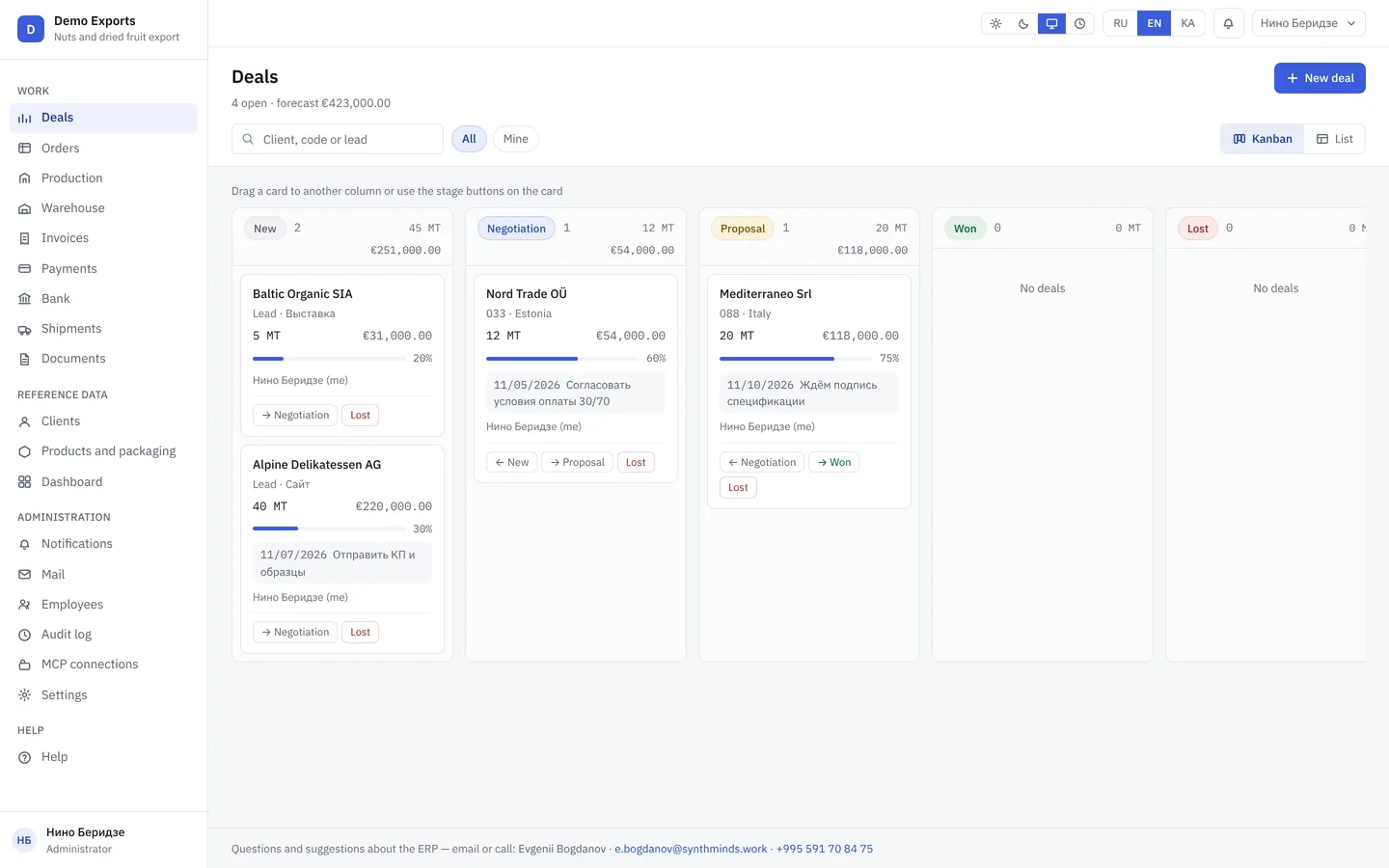
Deal pipeline: who is at which stage and how much money it is
Kanban by stage: new, negotiation, proposal, won, lost. Every card shows volume, amount, probability, owner and the next step with a date. The director sees the sales forecast without a report from the managers.
rewritefactory.erp
02 / 05
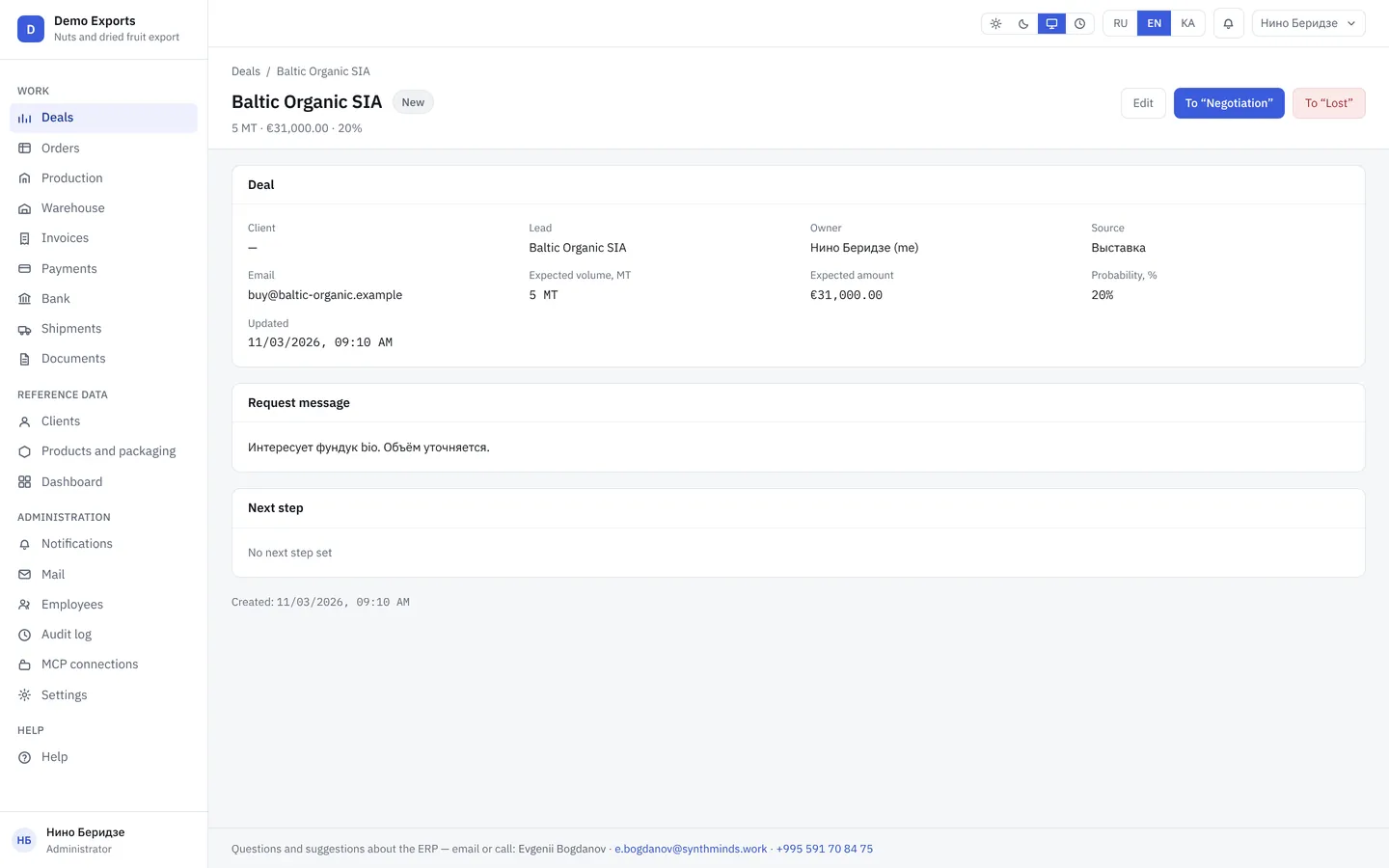
Deal card: history, next step, reason for losing
Where the lead came from, what was promised, when the next call is. A lost deal is closed with a reason, and six months later you can see why customers leave. A won deal becomes an order in one click.
rewritefactory.erp
03 / 05
Website leads land straight in the pipeline
The form on your website creates a deal in the CRM: name, contacts, the request text. The manager gets a notification and replies from the system. No lead gets lost in the inbox.
rewritefactory.erp
04 / 05
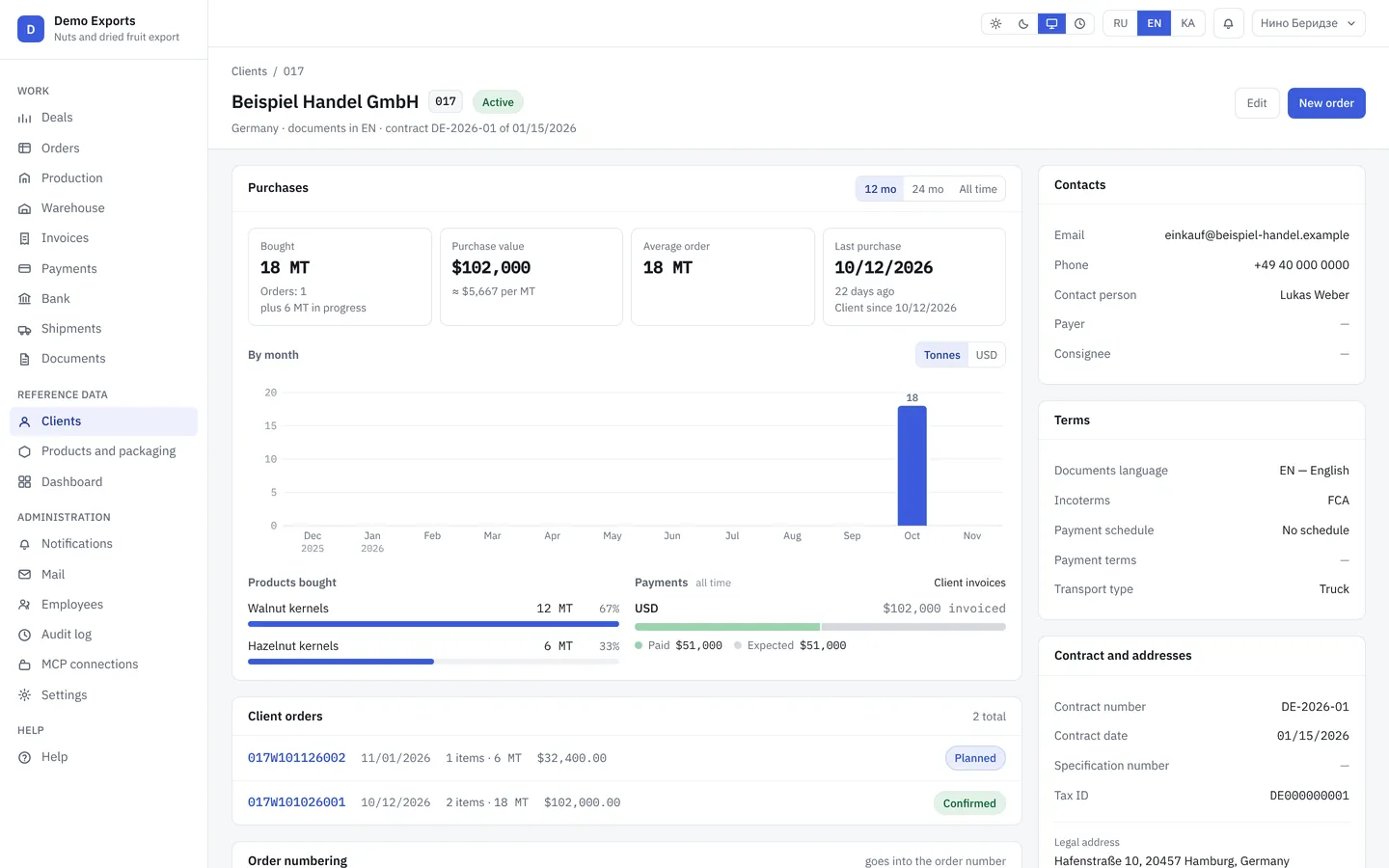
Customer card with contract terms
Company details, contract number and date, delivery and payment terms, document language, bank accounts. A new order and invoice take the terms from here, so the manager does not have to remember who gets which deferral.
rewritefactory.erp
05 / 05
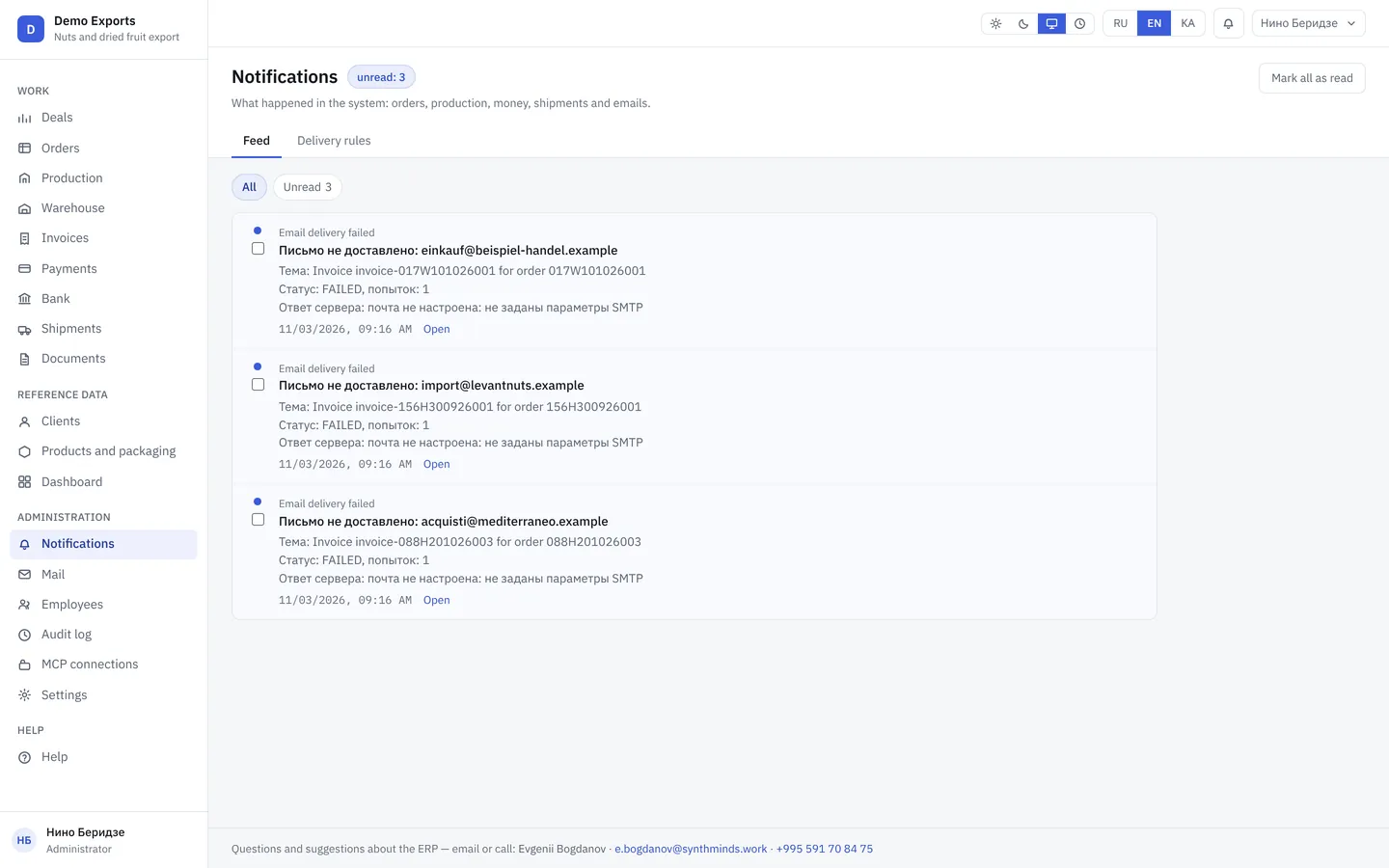
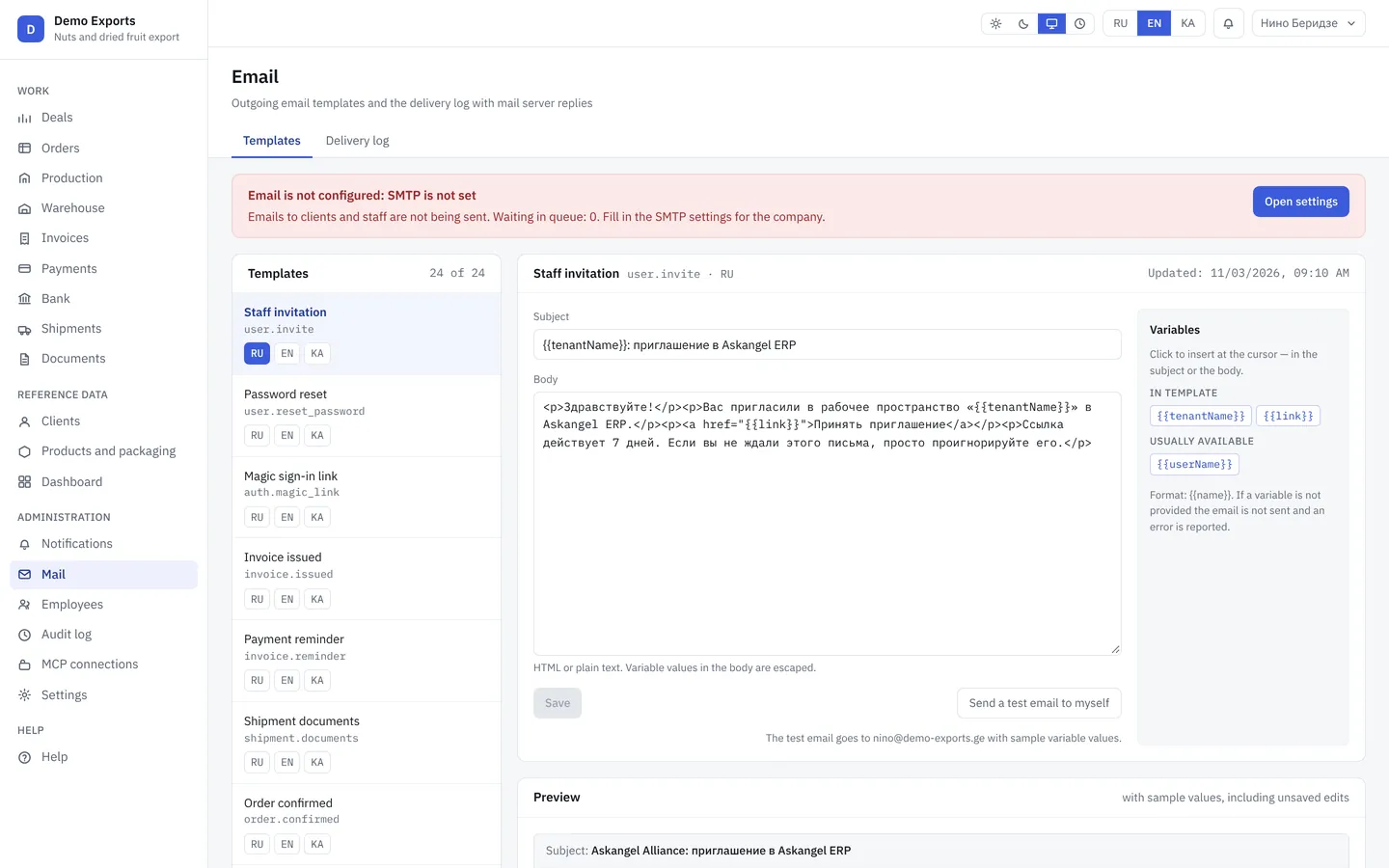
Emails to customers from the system, with a delivery log
Email templates in Georgian, English and Russian, the language comes from the customer card. You see which email went out, when and whether it arrived: the mail server’s reply is stored next to the deal.
What the CRM does on its own
The manager runs the deal, the rest happens without them.
Website lead → deal
The website form creates a deal at the New stage and notifies the owner.
Next step → reminder
Every deal has a next step and a date. An overdue step is highlighted in the list and in notifications.
Won → order
A won deal creates an order with the customer, volume and terms from the customer card. From there the ERP or your team takes over.
Email → in the customer’s language
The template fills in deal and customer data, the email language comes from the card. The send and the server reply are logged.
AI agents
AI agents can be connected to the system
AI agents take on the work of a sales director, a finance director and a first-line manager. An agent connects to the ERP like one more employee with limited rights: it reads orders, invoices, the bank statement and company documents, spots problems on its own, drafts emails and calculations and brings them to you for approval. Every figure has a source, and when there is no data the agent says so.
On request
Sales director (CSO)
Finds companies that match your customer profile: maps, search, LinkedIn, websites. Reads the site and scores it.
Writes emails from facts on that company’s website, not from a template. A four-touch sequence.
Sends only after your approval. Domain warm-up, stop lists, unsubscribe and a GDPR footer are built in.
Self-learning: it measures which segments and emails get replies and proposes changes to the customer profile and the texts on its own. You apply them.
On request
Finance director (CFO)
Answers “how much cash do we have and for how many months” from actual balances and the payment schedule.
13-week forecast, cash gaps, what-if scenarios. Every assumption is stated out loud.
Every figure carries a currency, a period and a source. A gap of more than 5 % to the document is a warning, not a silent fix.
On request
First-line manager
Answers incoming requests from the website, email and Telegram in Georgian, English and Russian.
Clarifies what the client needs and creates a lead or a deal in the ERP.
Hands complex questions to a human manager together with the conversation history.
How an agent connects to the ERP
1An administrator adds the agent to the ERP as a separate user and issues it an access key. The key can be revoked at any time.
2The agent gets a role like an employee: manager, logistician, accountant. It sees only what that role is allowed to see.
3Payments, invoicing and emails to clients are off by default. They are enabled separately, once the agent has earned trust.
Agents run on our platform (interface in Russian and English), the ERP stays on your server. Connected on request after the ERP implementation: interview, setup on your documents, pilot, live in two weeks. Price after the interview.
When production comes
The Rewrite Factory CRM and ERP are one system. Switch on production, stock, invoices and shipments, and a won deal moves down the conveyor with no data migration.
Roles and permissionsChecked on the server at every action, not by hiding buttons.
Audit logWho, when, before and after, with a reason. A recorded payment cannot be changed after the fact: a mistake is cancelled by a separate entry, and both stay in the history.
BackupsDatabase and documents daily, kept for 30 days.
Code in your GitThe source code and the data belong to you and live on your server.
When you do not need Rewrite Factory
Fewer than ten people and one spreadsheet.Too early. A system needs an owner inside the company.
You need bookkeeping, payroll and tax filings.That is Balance, Oris or 1C. We work beside them, not instead: the ERP holds all data for waybills and tax invoices, and an rs.ge integration is added on request.
You want a copy of someone else’s product.We build from your processes and requirements, not from another vendor’s product. We copy nothing.
Questions people ask on the first call
How is your CRM different from Bitrix24 or amoCRM?
No per-user fees or subscription: the system runs on your server and the code is yours. A deal does not end at Won: it creates an order, an invoice and documents. Interface and emails in Georgian, English and Russian.
How much does implementation cost?
The price is fixed and quoted after a 30-minute walkthrough and a process review. There is no fee per user; support is paid yearly. If the numbers show the system will not pay off, we say so up front.
Where is the data stored?
On your server or in your cloud. The code lives in your Git. Database and document backups run daily and are kept for 30 days.
Do we need our own developers?
No. We configure and support the system: yearly support covers updates, backups and a developer’s reply on a working day. The code and the data remain yours.
Which languages does the system work in?
The interface is in Georgian, English and Russian; each employee picks their own. Documents print in the customer’s language from the customer card: an invoice to a German buyer goes out in English even if the manager works in Georgian.
Can we connect AI agents?
Yes. The ERP exposes data to agents over MCP: list orders and stock, create an order or shipment, render a document. Each agent has a role, money actions are enabled separately, and every call is logged.
How long does implementation take?
It depends on the size of your catalogs and the data to migrate. We fix the timeline together with the price before work starts. The old system stays on until everything reconciles.
Who we are
A team from Tbilisi. More than ten years implementing SAP at large companies, now building our own systems for mid-sized businesses.
One person works with you from the first call to launch.